StegCracker — Steganography Cracker

StegCracker — Steganography Cracker

In the previous article we learned how we hide some secrets in media files using Steghide. In the way of penetration testing we may encounter with this type of files, in this article we are gonna cover how to recover a unknown stegnographed file. StegCracker is a tool that will help us to do that via bruteforce attack.

We first need to install StegHide in our Kali Linux system. We have a previous article on it click here to read that.

And then we open the terminal window and type following command :

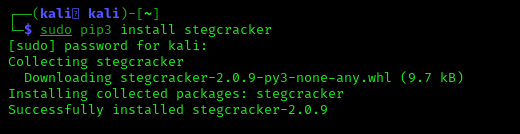
sudo pip3 install stegcracker

This command will download the StegCracker on our Kali Linux system. The screenshot is following:

installing stegcracker on kali linux
 
Now StegCracker is successfully installed in our Kali Linux  system, Now we are gonna crack a steganography brute-force to uncover hidden data inside a file saved in my Desktop.

We can see that we have two files in Desktop. The picture file is the the stegno file we are gonna crack and there is a password list to perform a brute-force attack. We have learned generating custom password list in our Crunch tutorial.

Now we need to reach the directory where we have the stegno file and password list, in our case they are in Desktop so we are gonna use following command:

cd Desktop

Now the final part we are going to crack the password and uncover secret data from the image by using following command:

stegcracker any-name.jpeg wordlist.txt

The screenshot is following:

Using bigger wordlist will increase chance cracking password.

To view what get we use cat command in the new output file:

cat any-name.jpeg.out

The screenshot is following:

Yes, we did this. 

 
Liked this article then please subscribe us to get e-mail notification on our latest articles. We are also available on Twitter and GitHub join us there and be the part of our family.
For anything problem please comment down below we always reply.

KP AKA Koushik Pal is a Security researcher and specialist focused on educating about Linux for cybersecurity and URL‑masking vulnerabilities. Creator of MaskPhish, a well‑known open‑source bash-based URL‑masking tool. Linux enthusiasts Active speaker, trainer, and advocate for secure web practices.

8 comments

comments user
Unknown

I've tried using this curl but getting a 404 message when trying to extract a message from a pic. Any thoughts?

comments user
Kali Linux

Hi, thanks for check and report. We have fixed this. Kindly check it and let us know everything is working now or not?

comments user
Milind Shah

can you give us images which you have used in this practical

comments user
Kali Linux

You can click on the images to enlarge and download them by right click > Save image as.

comments user
Milind Shah

i am going to crack the password and uncover secret data from the image but it takes too much time

does it takes more time to generate password from stegcracker tool ????????????

comments user
Milind Shah

i am not talking about tutorial images i am talking about image that you have used in stegcracker tool that is anyname.jpg

comments user
Kali Linux

Try the Steghide tool first to create a image with secrete message. Then try to recover that by using stegcracker. Cracking the text depend on how much time it need to crack the password first. If the password is easy then it should not take more than couple of minutes.

comments user
Kali Linux

The Image was downloaded from Google search. Here the link.

Post Comment