
LBD — The Load Balancer Detector
When we are in website penetration testing, we need to focus on Load Balancing. Now what is load balancing?
What is Load Balancing?
Load Balancing is a technique by using it, the website authorities make it run perfectly. Let’s suppose a website has a few visitors then it can be handled with a single server, but big websites have to control and manage the incoming traffic so they use multiple servers in multiple locations. Then our DDOS, LFI (Local File Inclusion), HeartBleed may not work. Generally these kinds of vulnerabilities can’t be exploited if the website/web application has multiple servers.
So, first we need to find out if the web application is using the load balancing technique or not. Here comes the LBD or Load Balancer Detector. This tool comes pre-installed on Kali Linux. If our Kali Linux system doesn’t have it we can simply use the command sudo apt install lbd -y to install it on our system.
How to use LBD on Kali Linux?
This is probably one of the most easy CLI-based tool on Kali Linux. We just have to type lbd followed by our target the terminal, as following:
lbd google.comIn the following screenshot we can clearly see that Google is using Load Balancing.
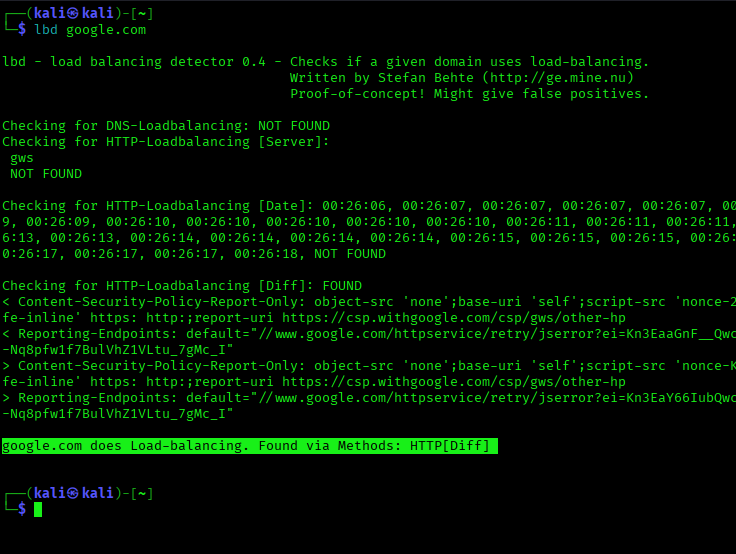
This is a very simple method of recon, but useful enough when testing medium to large companies. This is the way to use LBD on Kali Linux. If we found that a web application is using Load Balancing then we should not waste time on DDoS attacks, server-specific exploits, local file tricks. We should try Application-layer attacks like SQL injection, XSS, business logic, authentication flaws.
Enjoy our articles? Make sure to follow us on Twitter and GitHub, we post article updates there. To join our KaliLinuxIn family, join our Telegram Group & Whatsapp Channel. We are striving to build a community for Linux and cybersecurity. For anything we always happy to help everyone on the comment section and on Telegram Group. As we know our comment section is always open to everyone. We read each and every comment and we always reply.


Post Comment