5 tips to fix slow apt-get update or upgrade on Kali Linux

5 tips to fix slow apt-get update or upgrade on Kali Linux

Every Kali Linux user have faced slower internet speed’s problem in apt-get update or apt-get upgrade or apt-get install with the official repository. Using unofficial repository is not safe for a user, we strongly recommended to use the official repository but it is very slow, it took hours to archive a major update or download a bigger tool, then How we can fix the slow apt-get update or upgrade in Kali Linux ?

fix slow apt-get update or upgrade on Kali Linux

In this tutorial we are going to cover the ways how we can fix apt-get update or upgrade on our Kali Linux system.

  1.  Good internet speed.

    Updating Kali Linux is a slower process then other internet tasks. If we have a slower internet then it will be more slow, so please maintain a decent network speed.

  2.  Choose a proper DNS server

    Check for Domain Name Server by using following command :

    sudo mousepad /etc/resolv.conf

    This command will open a window like following:
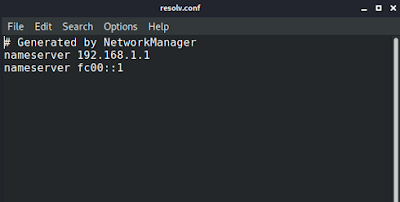
    kali default DNS

    Here we will add Google’s Domain Name Server
                                         8.8.8.8
                                         8.8.4.4
    This will look like following:
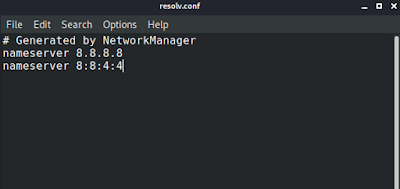
    Google's name server

    Then we can save and close the config file.

    Then we can clean by using following command:

    sudo apt-get clean
  3. Check the right repository.

    We should check our repository by using following command:

    sudo mousepad /etc/apt/sources.list

     The screenshot of the command is following:
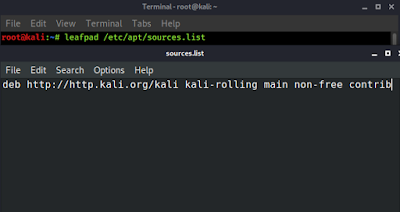
    kali linux official repository

     This server is usually overloaded by the users. But we should not try unofficial repositories that may break our Kali Linux system. See the #5 point to fix this.

  4.  Download via the http secure protocol

    We need to install a tool called apt-transport-https by using following command in our Kali Linux system:

    sudo apt-get install apt-transport-https -y

    This is a very small tool with 149kb size. So it will install in some second.

  5. Then we open the sources.list file in leafpad located at /etc/apt/sources.list

    We need to change the first http to https like following screenshot:
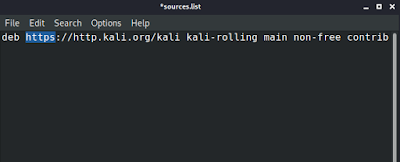
http to https
    Then we save and close it, and run apt update command to update the repository. Then we can check the internet speed of downloading big tools or upgrading system we’re sure that the speed will increase.

5.    Changing the HTTP

       We use this method if the other methods are not working. In this method we 
       open the sources.list file from the /etc/apt/ using following command:
sudo mousepad /etc/apt/sources.list
And then we change the second http to repo as seen in following screenshot:
Then save and close it. This change will boost the speed and make you happy.
These tricks should should help every user. So don’t forget to comment and follow us to stay updated. Now we are also available on Twitter & Medium.

KP AKA Koushik Pal is a Security researcher and specialist focused on educating about Linux for cybersecurity and URL‑masking vulnerabilities. Creator of MaskPhish, a well‑known open‑source bash-based URL‑masking tool. Linux enthusiasts Active speaker, trainer, and advocate for secure web practices.

19 comments

comments user
Unknown

it does'nt work.The detail are below
Err:1 http://repo.kali.org/kali kali-rolling InRelease
403 Forbidden [IP: 144.217.77.182 80]
Reading package lists… Done
E: Failed to fetch http://repo.kali.org/kali/dists/kali-rolling/InRelease 403 Forbidden [IP: 144.217.77.182 80]
E: The repository 'http://repo.kali.org/kali kali-rolling InRelease' is not signed.
N: Updating from such a repository can't be done securely, and is therefore disabled by default.
N: See apt-secure(8) manpage for repository creation and user configuration details.

comments user
Kali Linux

try with a reboot

comments user
Unknown

Thank you .It worked for me

comments user
Kali Linux

Yoo. That's grate. It is our success.

comments user
Anonymous

rebooted but does not work

comments user
Kali Linux

enter command
sudo mousepad /etc/apt/sources.list
then erase everything and paste following line
deb http://http.kali.org/kali kali-rolling main non-free contrib
then save and close it..and try again

comments user
Akjam

God, it is so stupid of you to actually suggest good internet speed. Whole world knows kali apt update is slow despite your internet speed.

comments user
kamaldnp

it is wrong it wroking on old version kali linux

comments user
kamaldnp

Hacking tool

comments user
Novice

Thanks!. It worked for me.

comments user
Unknown

Your work is help many people like me.
And i am appreciating to you and your team.
May GOD give you & your team more success.

comments user
Anonymous

worked for me…..
200kbps converted into 7000kbps
thanks..

comments user
Anonymous

Install this script from github and follow the on-screen instructions. It'll fix your problem and will do all necessary changes to your system automatically. Thanks me later! 🙂

comments user
sivakrishna

I am so glad that i found this article. I had 100KBps something it went upto 1MBps. Thank you so much.

comments user
Anonymous

whenever i changed and trying to save it says – failed to save

comments user
Anonymous

Do it as a root

comments user
Kali Linux

Ya you need to be on root

comments user
Unknown

thank you so much, it works fine now

comments user
Anonymous

Install this script from github and follow the on-screen instructions. It'll fix your problem and will do all necessary changes to your system automatically. Thanks me later! 🙂

Big thanks. This worked for me

Post Comment